

How Wiser Locker Protects Your Data
Published: 24 September 2026
Last updated: 24 September 2026
This security whitepaper is for anyone who wants to know exactly how Wiser Locker protects their photos. We publish our design because good encryption does not depend on keeping the design secret. It depends only on the password you hold.
- Your password is used only on your phone and is never sent to us. There is no backdoor and no master key that could unlock your Vault for you.
- Every file has its own random key. File lists, tags, and thumbnails are encrypted too.
- The Hidden Space has its own independent key. Opening it requires both your Vault password and your Hidden Space password.
- All encryption uses public, long-established standard algorithms.
- In the end, your protection depends on your password. Use a long password you do not use anywhere else.
1. How your password becomes a key
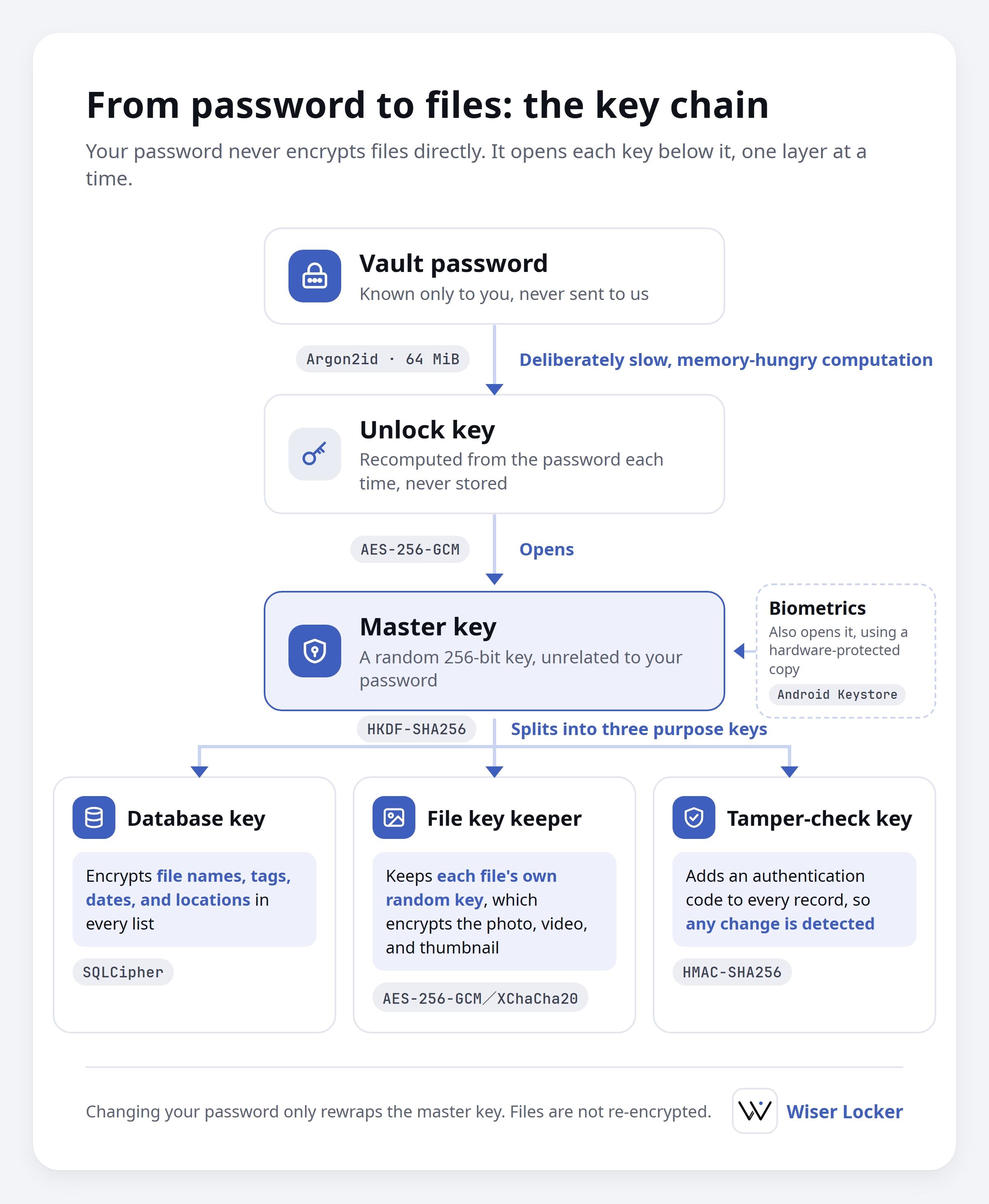
Wiser Locker never encrypts files with your password directly. Instead, it uses a chain of keys from top to bottom:
- Your Vault password goes through a deliberately slow, memory-hungry computation that turns it into an unlock key.
- The unlock key has one job: opening the master key. The master key is a random 256-bit key created with your Vault, and it has nothing to do with your password.
- The master key produces three purpose keys: one for the database, one for keeping file keys, and one for detecting tampering. Each has a single purpose, so leaking one would not reveal the master key.
- Every file has its own file key, stored encrypted by the file key keeper shown in Figure 1.
Because of this design, changing your password only rewraps the master key. It takes seconds, and none of your photos need to be re-encrypted.
The trade-off: changing your password does not replace the master key. If someone copied your whole Vault before you changed your password and also knows the old password, changing it will not lock them out of that copy.
2. How each file is locked
- When a file is added, it gets its own random file key. The original and its thumbnail each derive separate keys from it.
- Files are encrypted in 1 MiB chunks. Each chunk carries an authentication tag and records which file it belongs to, its position, and its length. Truncation, reordering, or mixing in another file’s data is detected and rejected.
- A file key is bound to its file and space. Moved to another file or space, it cannot be unwrapped.
- Moving a file between the Regular Space and the Hidden Space only rewraps its file key. The photo or video itself is never decrypted to storage.
3. File lists and tags
- File names, tags, filters, dates, locations, and statistics are all stored in an encrypted database.
- The database key is derived from the master key, so there is no separate password to guess.
- Every file record also carries an authentication code, so it cannot be altered without the key.
4. Two locks on the Hidden Space
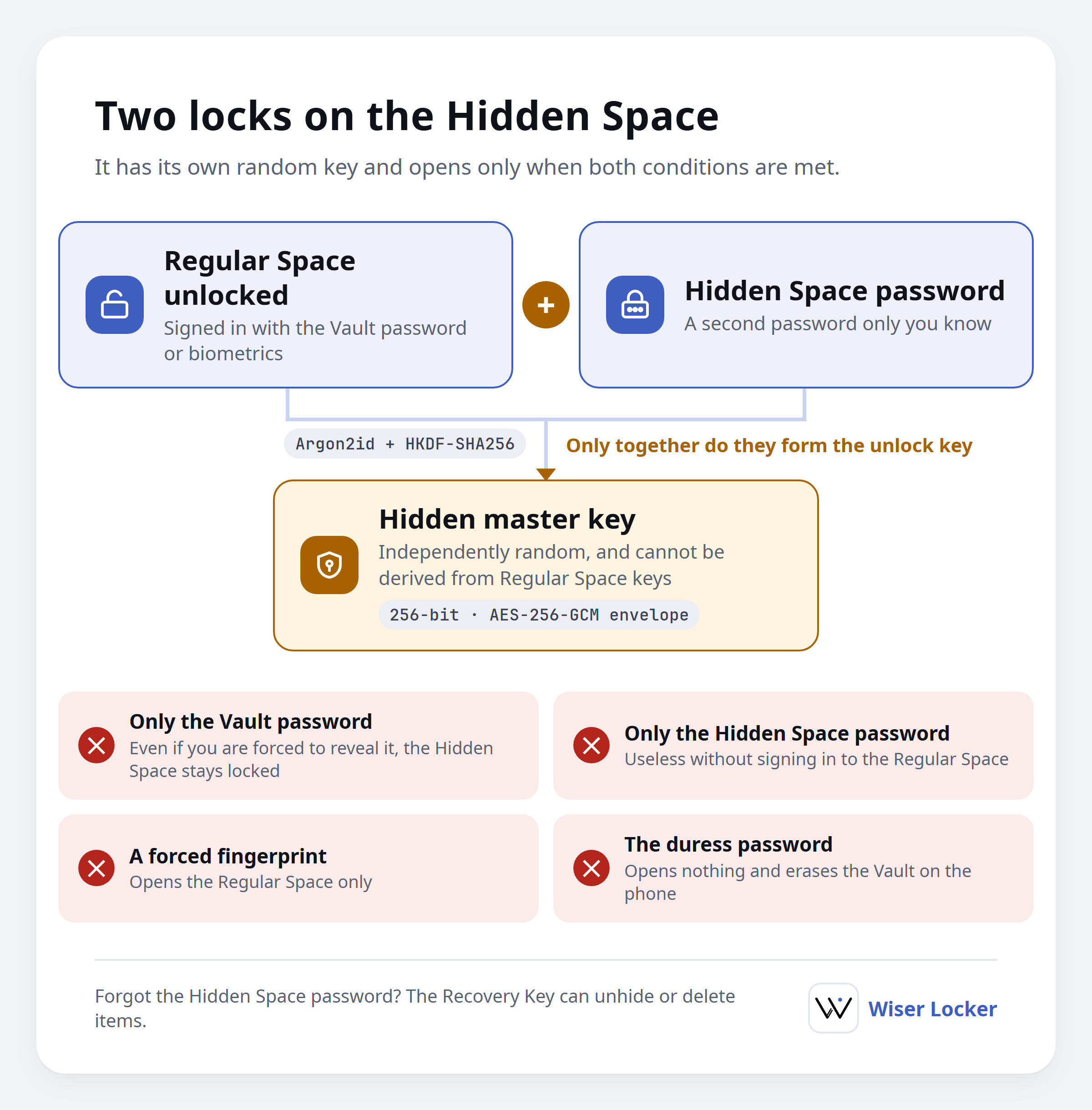
The Hidden Space has its own hidden master key. It is also random and completely unrelated to the Regular Space master key. Getting it out requires two things at the same time:
- The Regular Space is unlocked, meaning you have signed in with your Vault password or biometrics.
- The correct Hidden Space password.
Only the two together form the key that opens the hidden master key. As a result:
- Knowing only the Hidden Space password is not enough.
- Knowing only the Vault password, for example because you were forced to reveal it, is not enough either.
- Biometrics sign in to the Regular Space only and cannot open the Hidden Space.
The Recovery Key is a random code created when you set up the Hidden Space, for handling your data if you forget the Hidden Space password. It also works only while the Regular Space is unlocked. In the app, a Hidden Space opened with it is cleanup only: you can unhide or delete items but not view photos or videos. Cryptographically, however, it unlocks the hidden master key just like the Hidden Space password, so keep it just as safe.
We do not claim that nobody can tell a Hidden Space exists. Someone who can inspect the files on your phone may be able to see that you have set one up, along with roughly how many files it holds and how large they are. What we protect is the content.
5. Ways to unlock, and the duress password
| Method | What it opens |
|---|---|
| Vault password | The Regular Space |
| Biometrics | The Regular Space (a copy of the key is kept in Android hardware-backed secure storage and requires strong biometrics) |
| Hidden Space password | The Hidden Space, after signing in to the Regular Space |
| Recovery Key | Cleanup of the Hidden Space, after signing in to the Regular Space |
| Duress password | Nothing |
The duress password (a membership feature) is a separate password you set in advance. If you are forced to unlock the app and enter it, the app immediately erases the entire Vault on your phone and then shows either “Login failed” or an Empty Vault, depending on your settings. This cannot be undone, and it cannot delete .wlz backups you have stored elsewhere. The duress password’s storage format has no place to hold a key, so it can never be used to reach any data.
The app also slows down repeated password attempts. Note that this only limits attempts made inside the app; see section 9.
6. Backups
- Backup files (.wlz) are protected by your Vault password, but each backup has its own random key.
- File counts, sizes, and similar details are inside the encrypted content and cannot be seen from the outside of a backup file.
- Hidden Space data goes into the backup still encrypted as it is. Neither creating nor restoring a backup opens the Hidden Space, and you still need the Hidden Space password after restoring.
- Backups are fully checked before restoring. If anything is not as expected, the restore stops rather than overwrite your Vault with incomplete data.
7. Protection while you use the app
- Decrypted photos and thumbnails exist only in memory and are never written as temporary files.
- Videos play through a connection that is only reachable inside your phone, with a random, unguessable access code in the address.
- Screenshots and screen recording are blocked by default. Turning this off requires your Vault password.
- Locking, automatic locking in the background, or signing out immediately clears and invalidates the keys in use.
- The app opts out of Android system backup and exposes nothing to other apps.
- Optional usage analytics are off by default. Even when enabled, they record only which features are used, never file names, tags, content, or keys.
- Original files are written to your phone’s storage only when you choose to decrypt them.
8. What Wiser Locker protects against
| Situation | Result |
|---|---|
| Your phone is lost or stolen and the finder does not know your password | They see only encrypted data |
| Someone copies your Vault folder or a backup file | Without the password it stays locked, and every guess is expensive |
| You are forced to reveal your Vault password | The Hidden Space stays locked |
| You are forced to use your fingerprint | Only the Regular Space opens |
| You are forced to enter a password | You can enter the duress password to erase the Vault on your phone |
| Someone tampers with encrypted files, records, or backups | The change is detected and rejected |
| Another app tries to read your content | It has no access |
9. What Wiser Locker cannot protect against
Please understand these limits:
- Weak passwords can be guessed offline. Your Vault lives in your phone’s shared storage. Someone who gets the whole folder can copy it to a computer and guess passwords without limit, outside the app’s retry delay. Each guess is slow, but a short password such as six digits can still be found. Use long passwords for both your Vault and your Hidden Space.
- A compromised phone. If your phone is rooted or infected with malware, an attacker can read the screen or memory while you are unlocked.
- Someone watching or filming your screen. Blocking screenshots does not stop another camera.
- Forgotten passwords. There is no backdoor. If you forget your Vault password, your data cannot be unlocked. If you forget your Hidden Space password, the Recovery Key can only unhide or delete items.
- Copies made before a password change. See section 1.
- Backups already copied elsewhere. The duress password erases only the Vault on your phone. It cannot delete .wlz backups stored anywhere else.
- The existence of a Hidden Space. See section 4.
10. What we deliberately do not do
- We never receive or keep your Vault password or any of your keys. Our servers have no copy of your Vault password, master key, or Recovery Key, so we cannot see your data or recover your password for you. Today your Vault exists only on your phone. When cloud sync becomes available, the cloud will hold only your encrypted Vault, and we still will not receive the Vault password or keys that unlock it.
- We do not lock your Vault to one phone. After reinstalling or moving to a new phone, your password and your Vault folder (or a backup) are all you need. The trade-off is the offline guessing risk in section 9.
- We do not invent our own encryption algorithms.
11. Technical specifications
For readers who want the details:
| Purpose | Standard used |
|---|---|
| Deriving a key from a password | Argon2id: 64 MiB memory, 3 iterations, parallelism 2, random 16-byte salt each time |
| Deriving subkeys | HKDF-SHA256, separated by purpose, space, and Vault |
| Wrapping keys | AES-256-GCM |
| Photo and video content | AES-256-GCM or XChaCha20-Poly1305 (selectable in Settings), authenticated encryption in 1 MiB chunks |
| Database | SQLCipher |
| Tamper detection for records | HMAC-SHA256 |
| Random numbers | The operating system’s cryptographically secure random number generator |
| Key length | All master keys, file keys, and the Recovery Key are 256 bits |
The Argon2id parameters are fixed in the format and rejected if they differ when read, so nobody can edit a file to weaken the computation.